

Your forwarding, run by a team of agents.
Cross-cutting artificial intelligence built into the solution, with specialized agents according to the components you contract, at no separate additional cost.
It's not a generic ERP: it's built by people who lived the operation and ran a carrier's own TMS.

From quote to cash, with the whole team at work.
ERP demo, 3 minutes. Illustrative interface · fictitious data.
What would you get with erp4Forwarding?
Stop firefighting: the system handles the repetitive work, and you decide only what actually matters.
The old TMS told you what already happened. erp4Forwarding warns you before and during: a truck running late, one detained too long, a cancelled sailing — and escalates automatically to the right person.
CRECE
Atlas Quote
AI Quoter
Atlas Quote’s assistant helps your client by chat or voice, at any hour. It guides them step by step — origin, destination, cargo and incoterm — and won’t move on without the essentials, so no incomplete requests reach you. It never improvises a price: it captures the full request and leaves it ready for a sales executive to quote. In your name and your tone, the client talks to you.
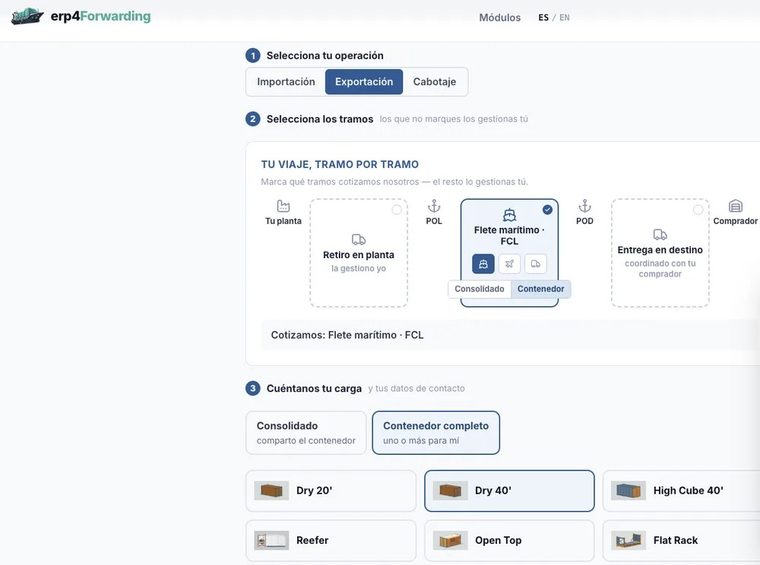
 Atlas QuoteAI assistant
Atlas Cartera
A client portfolio that fills itself
The commercial module is calculated from your shipments: nobody types anything. It shows which client is leaving, which are active and how much of your sales depends on a few.
- Clients at risk: spots the one that has gone twice its usual rhythm without shipping. The threshold is each client’s own, not a fixed number.
- Scoring of each client with weighted variables: frequency, volume, credit, tenure, on-time payment, profitability and compliance.
- Client ranking by sales and margin, and concentration: how much your top three weigh.
- Rates about to expire and unanswered quotes, with the client left exposed.
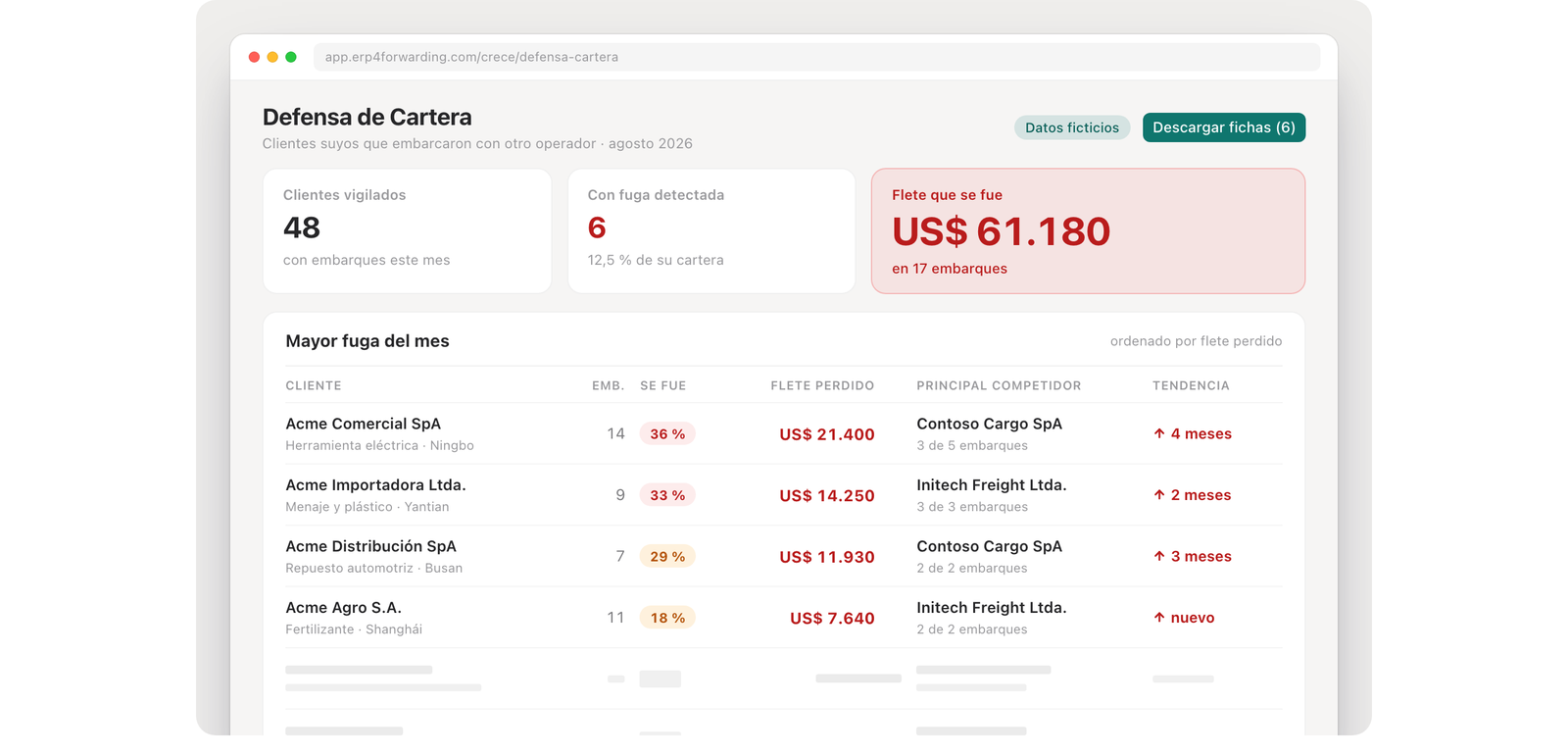
Atlas also, in CRECE: Measured presence on Google and in AI assistants.
DIGITALIZA
Atlas Analytics
Finance: Revenue, Cost and Margin
Cost, revenue and margin on each shipment; calculates commissions and warns when what was charged does not match the agreed rate. Includes pivot-style analysis (pivot table) of revenue, costs and margins.

Atlas Finance Management
E-invoicing (DTE/SII)
Issue the electronic invoice (DTE) from the shipment, from the sale you already loaded and without re-typing. The connection to the SII (Chile’s tax authority) is being integrated.
- Loads the shipment from the purchase/sale record by BL or booking, in one click.
- Taxable invoice, exempt invoice and commercial invoice. If the shipment carries both kinds of service, it prepares both drafts.
- Converts USD to CLP at the purchase/sale exchange rate.
Being integrated: The connection to the SII, through SimpleAPI, is being integrated. Until it is in production, the invoice is prepared and reviewed, but not issued to the SII.

The thousand-dollar mistake, before it sails
Before approving the BL, the AI compares what your client instructed — the matrix — against what the carrier issued, field by field, and flags every difference with a traffic-light indicator. A wrong container or weight gets caught now, not when it’s too late.

Atlas also, in DIGITALIZA: The thousand-dollar mistake, before it sails · Operating Base · Pricing Desk · The shipment paperwork.
AUTOMATIZA
What other systems don’t have
Atlas Inbox
The shipment’s email
Every email that arrives is classified on its own and dispatched to the master record it belongs to: the client, the supplier and the shipment. Nobody forwards or retypes.
- Classifies by type: quote, rate, shipping instructions, BL, booking, invoice, collections, complaint, incident and more.
- Sorts it by area: Commercial, Documentation, Finance, Operations, After-sales and Administration.
- Reads attachments too (Excel, PDF): classifies by content, not by subject line.
- Reads the references (PO, BL, booking, container) and links the email to the shipment.
- Proposes the reply; you approve it. And you can correct a classification by hand.
What it includes: A shipment's emails stay in its shipment file, visible to the team; AI classifies them and proposes a reply.
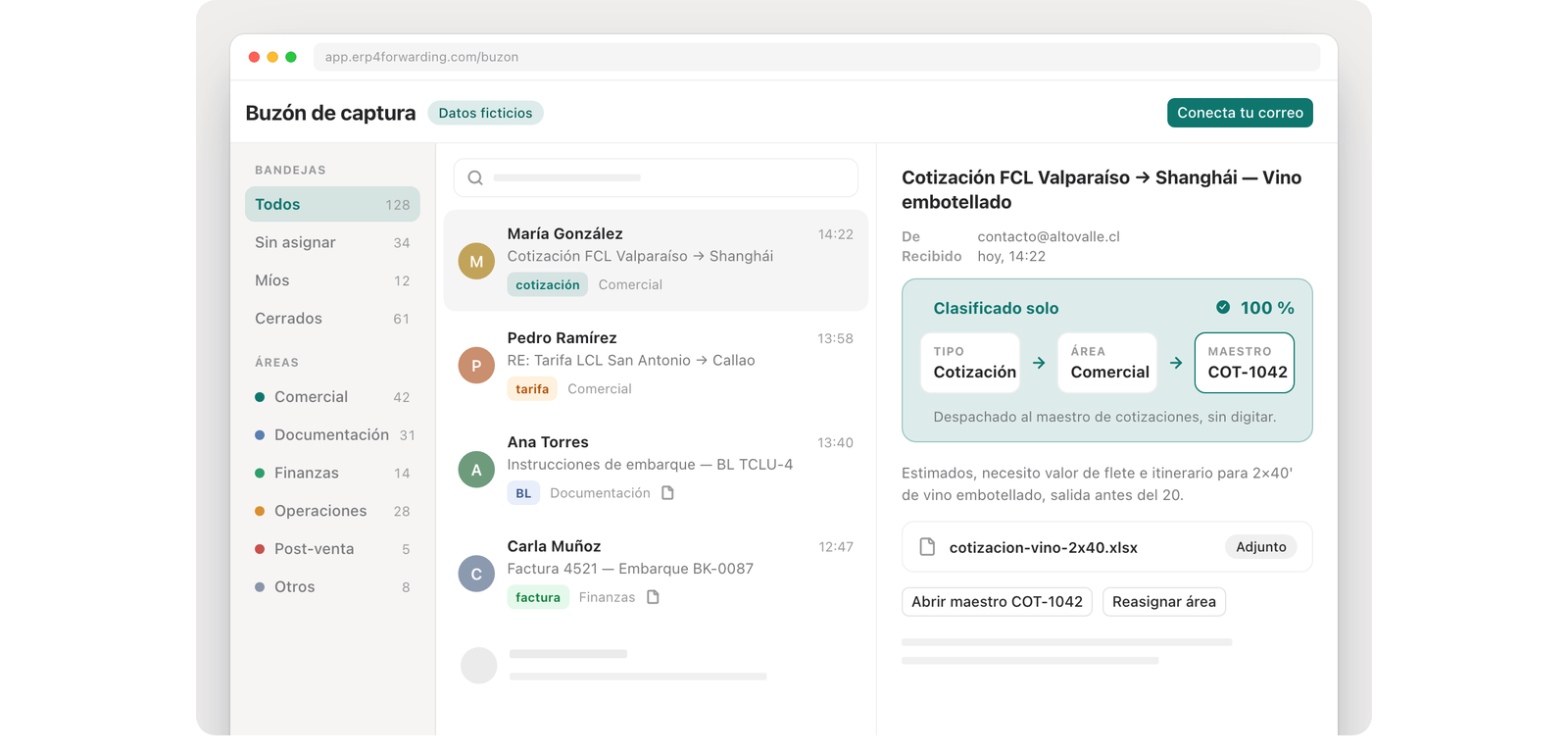
View of the ERP inbox. Illustrative interface · fictitious data.
Atlas Proactive
Proactive alerts
It alerts you to what is slipping with your clients and your cargo before the client tells you, and leaves the draft written for you.
Scope: At this stage Atlas recommends: it does not write to your clients or to the carriers.
Atlas also, in AUTOMATIZA: Where every shipment is.
CONECTA
Atlas Portal
Portal for your clients
Your clients see their cargo and account statement without calling you; each one sees only their own.
Atlas also, in CONECTA: Vendor integrations · The trucking leg · Customs manifest preparation · Accounting and tax.
How much would you save?
An estimate based on your volume. Adjust the assumption and watch it change.
This is the assumption, right in front of you. Raise or lower it based on how your team works today.
Calculation: shipments × minutes ÷ 60 = hours/month. Full-time equivalent ≈ hours ÷ 160 (one full-time role ≈ 160 h/month). This is a projection based on your volume, not a figure measured at an actual client.
BKLOG runs its international trade operation on erp4Forwarding.
Boutique ocean forwarder · 20+ years · woman-led · Santiago, Chile.

- Shipments and vessel tracking
- Buy / sell
- All master data
- Invoicing prep — the system shows them what to invoice
- Atlas answers questions in plain language
We're a boutique operation: our edge is close, personal service. erp4Forwarding gives us the visibility and control to respond fast when it matters most, without losing that personal touch.
Carolina Araya
CEO · BKLOG
LinkedIn ↗What every forwarder asks first
How is this different from my spreadsheets or what I use today?+
Spreadsheets don't alert you, don't cross-reference data, and get messy as your team grows. erp4Forwarding connects quoting, booking, operations and billing in a single thread: nothing gets lost and everyone sees the same thing. Plus it adds AI agents that handle the repetitive tasks for you.
Does it work for a small agency, or only large ones?+
It works from a small agency onward. The sooner you get your operation organized, the easier it is to grow without adding headcount. The system adapts to your size — BKLOG is a boutique forwarder.
How long does it take to get up and running?+
Typically one to two months. It mostly depends on two things on your end: your master data (your client and vendor book) and your carrier credentials. Once that's ready, the erp4Forwarding team is not the bottleneck.
Is my data secure?+
Yes. Every agency has its own fully isolated space — its own database, daily backups and per-user access. Your information is yours and is never shared with any other agency.
Do I need to install anything or buy servers?+
No. It runs in the cloud: you access it from a browser or your phone. We take care of the infrastructure and the security.
Does the AI really read matrices and BLs?+
Yes, and it's one of the most-used features: it reads each client's matrix in their own format (Excel, PDF), extracts the data, and before approving the BL compares it field by field against what was instructed — with a traffic-light indicator flagging every difference. Errors get caught before the cargo sails, not after.
Have another question? Ask Orie, our voice advisor — the floating button on this page.
Build your team around your operation.
Pick the agents you need and see the quote right away.